

The costly SEO penalty myth about hidden text
By Anne-Mieke Bovelett on December 7, 2025
Status: up to date
Why visually hidden text will not hurt your SEO
I keep hearing the claim that visually hidden text will trigger an SEO penalty, and I understand why it unsettles people. It sounds plausible at first glance. Google does penalize hidden text, and no one wants to risk their rankings. But this is one of those cases where a small misunderstanding creates unnecessary fear and holds teams back from doing the right thing.
This myth keeps coming back
Every few months, the same claim surfaces in SEO circles. Last week it also came up as a question during a presentation I gave in Zürich, Switzerland. Sure, it sounds plausible at first glance. Google does penalize hidden text, and no one wants to risk rankings. But this myth keeps people from implementing accessibility correctly, and that is where real damage happens.
When you read Google’s documentation, the distinction becomes very clear. It’s manipulation that’s penalized, not accessibility.
What Google actually targets
Hidden text penalties focus entirely on deceptive techniques. Think of white text on white backgrounds, keyword blocks pushed off-screen, keyword stuffing in alt text, paragraphs shrunk down to zero pixels, or any attempt to show one version of content to search engines and another to users. These practices are explicitly listed under Google’s spam policies.
They have nothing to do with visually hidden text used to support assistive technology.
A label for an icon-only button, a skip link that becomes visible on focus, or a piece of hidden context for a generic link (“Read More” is an example of a generic link) is not deceptive. They are accessibility essentials and make the experience clearer for users navigating in different ways. Google knows this and treats it accordingly.
Why accessibility techniques align with strong SEO
Accessibility and SEO often point in the same direction. When you clarify something for assistive technology, you are usually clarifying it for Google too.
A visually hidden label like “Search” tells a screen reader what an icon does. It also tells Google. A link that says “Read more about our support services” instead of only the visual “read more” text, gives immediate context to someone navigating by links. It gives the same clarity to search engines.
Sometimes a developer or someone using a page builder is forced to put a complex visual text structure in lots of tiny text blocks, aligned in creative ways, like in pricing tiles with striked-through amounts where there is a sale. When those text boxes are read by a screen reader, the construction typically makes no sense at all. And before you go all “But blind people don’t visit my website!” you may want to read this article, called The e-commerce industry’s billion-pound mistake. Besides that, assuming that only blind people use screen readers is quite naive. Among them are also:
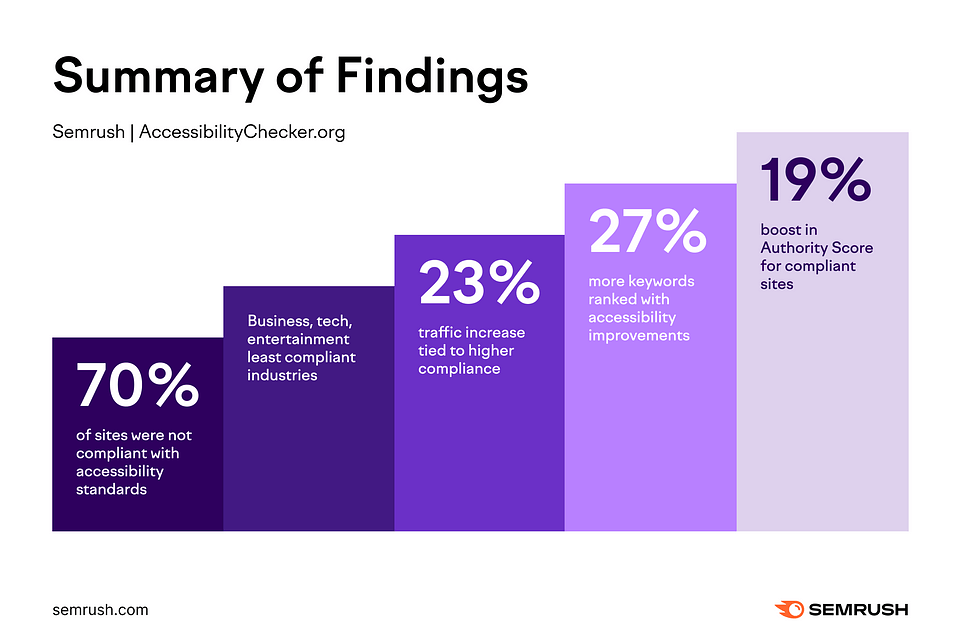
Semrush recently published data from a study where 10.000 websites were tested, showing that accessible websites tend to perform better in search. Their study found measurable SEO improvements after accessibility work was done, particularly around structure and clarity. You can read it here: Why accessibility matters more than ever for SEO performance. For the heck of it, I’ve added their results chart below.
How Google distinguishes accessibility from spam
Google has seen every trick in the book. They know what spam patterns look like, and they know what accessibility patterns look like. Accessibility text is short, contextual, placed near the element it describes, and improves usability. Spam is long, irrelevant, repetitive, and disconnected from the visible content.
These differences are obvious to humans, and they are obvious to algorithms that have been trained on billions of pages. If your visually hidden text exists to support the user experience, you are not in SEO penalty territory. Google’s algorithms have gotten quite good at distinguishing legitimate accessibility patterns from spam. They look at several factors.
Is the hidden text brief and contextual, or is it paragraphs of keyword stuffing? Does it relate directly to visible content, or is it completely disconnected? Does it follow established accessibility patterns like .sr-only or .visually-hidden classes? Is it improving the user experience, or just trying to rank for more keywords?
When you’re using visually hidden text for legitimate accessibility purposes, the pattern is obvious. The text is short, relevant, and positioned near the content it describes. It makes the page more understandable, not less.
Technical tip for developers
Implementing visually hidden text the correct way
The proper way to implement visually hidden text is well documented in accessibility guidelines. You create a CSS class that positions content off-screen or uses clip properties to hide it visually while keeping it in the accessibility tree.
Something like this:
css
.sr-only {
  position: absolute;
  width: 1px;
  height: 1px;
  margin: -1px;
  padding: 0;
  overflow: hidden;
  clip: rect(0, 0, 0, 0);
  white-space: nowrap;
  border: 0;
}
Then you apply it where you need it. For example, in the case of this icon-only button.
html
<button>
  <svg aria-hidden="true"><!-- icon --></svg>
  <span class="sr-only">Search</span>
</button>
The real missed opportunity
The real danger here is not a Google penalty. It’s actually teams holding back from implementing accessibility because they fear imaginary consequences. That hesitation leads to poorer usability and sometimes poorer SEO too. And as such, it is a costly mistake.
When people strip useful labels or avoid providing context for links, they make life harder for users who depend on assistive technology. They also make content harder for search engines to interpret, meaning that everyone loses something in that scenario. A site misses out on conversions.
Understanding accessibility makes you a better SEO professional
The best performing SEO professionals understand that modern SEO is about clarity and structure. But sometimes it feels to me that only the best of the best of these specialists know accessible websites often outperform inaccessible ones because they are simply easier for both humans and crawlers to understand. They will tell their customers about the importance of correct heading order, alt text on images and clear and concise descriptions on infographic in their content.
They will also explain to their customers that great color contrast on functional parts of the website, like text and Call to Action, increases conversion.
This is why you, as a professional SEO advisor, should insist on being part of the earliest stages of a new website or a redesign! Getting your customer to fix accessibility issues after the fact is usually a mission impossible.
Where links and buttons are concerned, that’s more the realm of Click Rate Optimization (CRO). Many offer these services combined. And even though CRO and SEO are distinct disciplines, they overlap heavily and influence each other. SEO focuses on getting the right people to your site. CRO focuses on what happens once they arrive, how well the experience supports their goals, and whether they complete the actions you want them to take.
They use different methods, success metrics, and mindsets, but strong SEO without CRO leaves money on the table, and strong CRO without SEO leaves potential untapped.
In practice, teams that treat both as part of one ecosystem usually perform far better. Accessibility fits right in the middle, because improving clarity, structure, and usability helps both search engines and human beings convert more smoothly.
Successful SEO consultants treat accessibility as part of a complete SEO strategy, not as a risk factor. It’s that mindset that makes them better professionals. And the aforementioned study from Semrush is just one of many examples.