
The relationship between conversion and digital accessibility
What is digital accessibility
Digital accessibility refers to the practice of designing and developing websites, software, mobile apps, and other digital technologies in a way that can be used by everyone, regardless of their abilities or disabilities. This includes people with visual, auditory, motor, cognitive, and speech impairments.
Why it matters
Digital accessibility matters because it unlocks the full potential of the online world for everyone, regardless of ability. This commitment to accessibility does not only reflect ethical responsibility but also unlocks a wider customer base, enhances usability for everyone, fosters brand loyalty. It helps businesses stay on the right side of evolving legal requirements around the globe.
Key Benefits
Ethical Responsibility: Creates a more inclusive and just digital world.
Improved UX for Everyone: Clear navigation and content structure benefits all users, not just those with disabilities.
Legal Compliance: May be a requirement based on your location and industry to avoid potential lawsuits.
Expanded audience: Ensuring your websites and webshops are accessible opens your products or services to a wider range of potential customers, users, or participants.
People with a disability in the EU
101 million
People
1 in 4 adults
have a disability
Worldwide
An estimated
1.3 billion
People
1 in 6 people
experience significant disability
How it relates to conversion
Expanded audience!
Ensuring your websites and webshops are accessible opens your products or services to a wider range of potential customers, users, or participants.
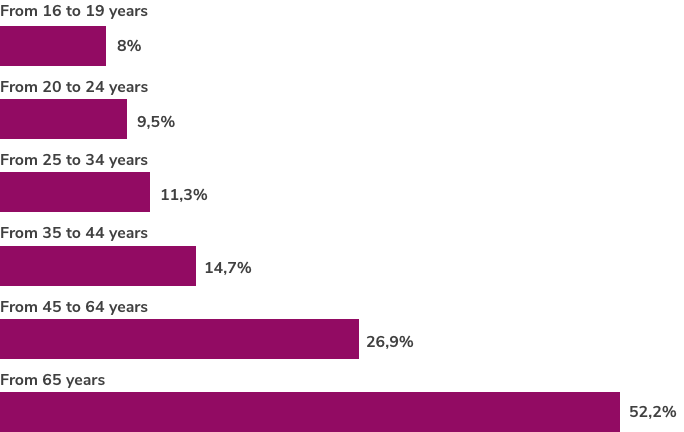
People with disabilities by age group in 2022
The older you get, the more likely to have a disability.
- From 16 to 19 years: 8%
- From 20 to 24 years: 9.5%
- From 25 to 34 years: 11.3%
- From 35 to 44 years: 14.7%
- From 45 to 64 years: 26.9%
- 65 years or over: 52.2%
Source: Eurostat
More women than men
According to statistics, in the EU, on average, 29.5% of the total female population has a disability, compared to 24.4% of the total male population.
Legal Implications
Overview of Global Accessibility Laws
Across the globe, legal frameworks are emerging to ensure equal access to digital experiences for individuals with disabilities. Key examples include the Americans with Disabilities Act (ADA) in the United States, the European Accessibility Act (EAA) binding EU member states, and similar legislation in regions like Canada and Australia. These laws establish a legal obligation for businesses, government agencies, and other organizations to provide accessible websites, mobile applications, and digital services.
Influential examples
- Americans with Disabilities Act (ADA)
This foundational US civil rights law extends protections to individuals with disabilities in various spheres, including the digital realm. Websites and apps connected to places of public accommodation (businesses, government services, etc.) must be accessible. - European Accessibility Act (EAA)
This legislation aims to standardize accessibility requirements across the European Union. Businesses providing a wide range of products and services, including e-commerce, banking, and transportation, will need to comply by June 2025.
Legal Repercussions for Non-Compliance
Failure to uphold digital accessibility standards can have serious consequences for businesses. The specific legal repercussions depend on the legislation in play, but potential implications include:
- Lawsuits:
Individuals with disabilities may pursue legal action, alleging discrimination due to website or service inaccessibility. This is a primary driver of ADA enforcement in the United States. - Fines and Penalties: In places with strong enforcement bodies, businesses face substantial fines for non-compliance with accessibility laws.
- Reputational Damage: Neglecting accessibility paints a negative picture of a business, potentially deterring customers and harming brand image.
Beyond the legal implications
It’s a missed business opportunity
When websites or applications lack accessibility features, they effectively shut out a significant segment of the population. This translates to a smaller customer base and lost opportunities for growth and revenue.
Economic Value
Digital accessibility can significantly enhance brand reputation and loyalty
You demonstrate inclusivity & social responsibility
Committing to accessibility shows customers that you genuinely care about serving all users, regardless of ability. It signals a commitment to inclusivity and ethical practices, boosting your brand’s standing.
It fosters a positive user experience
Accessibility often overlaps with general usability. Clear navigation, simple language, and well-structured content benefit everyone, not just those with disabilities. This positive experience builds trust and goodwill.
It creates a customer connection
When a person with a disability has a smooth and satisfying interaction with your website or service, they feel seen and valued. This can forge deeper customer loyalty and advocacy than purely transactional relationships.
Aligns with Brand Values
Many brands already emphasize diversity, social good, and customer-centricity in messaging. Practicing accessibility is a tangible way to walk the talk, strengthening the authenticity of brand promises.
It differentiates from your competitors!
With accessibility still not a given, businesses prioritizing it stand out in a crowded marketplace. Customers with disabilities and those who value inclusivity may deliberately choose your brand over less accessible alternatives.
How it translates to loyalty
Repeat Business:
Users who have a positive, accessible experience are more likely to return. Frustration-free interactions encourage continued patronage.Word-of-Mouth and Advocacy:
Customers who recognize your accessibility efforts are more likely to recommend your business to others, particularly within communities of people with disabilities.Positive Brand Sentiment:
Accessibility fosters a favorable overall brand image. Consistent positive sentiment lays the foundation for long-term brand loyalty.
The Disability Market influences over $13 trillion in annual disposable income
A market bigger than China, the Disability Market influences over $13 trillion in annual disposable income. As this giant market emerges, Return on Disability explores opportunities for public companies and governments to add economic value by delighting customers and attracting the best talent.
ROD Group, The Global Economics of Disability 2020
Usability and User Experience (UX)
User experience and accessibility go hand in hand
Usability is a core component of a positive user experience. A website can’t provide a good UX if it’s difficult to use, confusing, or filled with barriers.
Accessibility expands usability.
Accessibility principles address specific needs of people with disabilities, but the outcomes are often broadly beneficial. Clear headings and organized content improve ease of use for everyone.
Sufficient color contrast aids people with low vision but also makes the site easier to read in bright sunlight. The ability to navigate without a mouse benefits those with motor impairments and power users who prefer keyboard shortcuts.
SEO Benefits from semantic and structured content
It’s not about “tricking” search engines. Accessibility and good SEO have the same core goal: presenting content clearly and effectively to your target audience, whether that audience includes humans or web crawlers!
Search engines better understand your content
Improved search visibility
Enhancing user experience
Real-World Impact of Digital Accessibility
The impact of a lack of accessibility is highly underestimated
The year is 2024, there is Google ReCaptcha, Cloudflare HCaptcha, which offers universal solutions, but you have decided to implement your own captcha solution at the reseller login. What do we do about your security code that doesn’t offer the necessary support for accessibility?
Can Kirca, blind, DevOps – on X
You are not your customer
Like so many, Can is someone who buys lots of tech online. The shops he addresses here walk away from a significant portion of revenue. Inaccessible CAPTCHA easily excludes 25% of your visitors. Whatever you assume about your potential visitors and buyers, will always be a projection from your perspective. As you are a single individual, that perspective is not broad enough to understand the impact of issues you don’t experience in your daily life.
On account creation, it annoys the snot out of me when my strong password is “too strong.” There should be a note by the form label stating the max length and excluded characters. Also, bugs me when I can’t paste in a password. Don’t make me type 20+ characters.
Carrie Dils, on X
Would you want to buy something in a store where you’re being offended?
Of course, you wouldn’t. Issues like the one Carrie describes here are quite offensive to users, and thus your potential customers. You chase them away.
Case Study: The investment in an accessible web shop that resulted in 37000% ROI
The European Commission cites this case in a press release
A study by the UK’s Royal National Institute of the Blind showed that a £35 000 investment by a supermarket chain in making their website accessible brought in additional revenue of over £13 million a year. (Fifth paragraph in a press release called “European Commission seeks public input on measures to break down barriers to disabled people” by the European Commission.)
That supermarket chain was Tesco!
You can find a more elaborate article about this case in my blog section.
Mind-blowing facts
1. This case is from more than 20 years ago
If anyone tries to tell you that online accessibility is something new and fashionable, now you know better.
2. They understood the value of user testing
This still stands today: Theory may get you a long way, automated testing is cool but also has limits. Nothing beats user testing by your target audience.
3. The number of key changes for accessibility was relatively low
They chose mainly to focus on blind and partially sighted visitors. Knowing the numbers, imagine how much more revenue they could have had when they had opened their digital doors to people with other disabilities.
Best Practices in Digital Accessibility
This usually tends to get a bit technical. It’s important to know that although often the emphasis seems to be put on the visual and hearing impaired, the group of consumers depending on accessibility is much larger than that!
Understanding that it is a shared responsibility is your starting point!
Understanding this is the start of best practices. Creating and maintaining a website has several disciplines involved. Look at it like you run a company. Nobody is expected to be all the departments at once. The functional design, the graphic design, the technical development and the creation of content are separate departments. Once you break it down to that, you will see that honoring these best practices is not as complex as it seems.
Web design and development
Using the right HTML tags, adding ARIA roles where it can’t be coded semantically only, selecting the right colors and fonts are key to making websites user-friendly for everyone.
Proper HTML tags help assistive technologies to understand and navigate the site better. ARIA roles provide extra details about interactive parts of the site, making sure people with disabilities can use them easily. Accessible color and font choices, with good contrast between text and background, are crucial for people with visual impairments, including those who are colorblind. These practices make web content easier to see, use, and understand for all visitors.
Accessible Multimedia
Accessible multimedia ensures that audio, video, and other media content are usable for everyone, including those with disabilities. This involves adding alt-text, which provides short descriptions of images for visually impaired users who rely on screen readers.
It also includes captions for videos, representing spoken dialogue and important sounds to assist those who are deaf or hard of hearing. Additionally, providing transcripts, which are written versions of audio content like podcasts, makes the material accessible to those who cannot hear or prefer to read. By integrating these features, multimedia content becomes more inclusive and understandable for all users.
Clear and concise text content
Clear and concise accessible text content refers to writing that is easy to read and understand for all users, including those with cognitive disabilities or limited literacy skills. This type of content uses straightforward language, avoids jargon and complex sentence structures, and organizes information logically.
It also includes clear headings, bullet points, links that can be understood without context and short paragraphs to enhance readability. By being clear and concise, the text ensures that the message is effectively communicated to a diverse audience, making the content accessible to everyone.
Testing and feedback
Regular accessibility audits and inclusive testing with users with disabilities are crucial for creating truly accessible web experiences. Accessibility audits systematically review a website to identify and fix barriers that could prevent people with disabilities from using it effectively. These audits ensure that the site complies with accessibility standards and guidelines. Inclusive testing, which involves users with disabilities, provides invaluable insights into real-world usability and helps uncover issues that automated tools might miss. By conducting these audits and tests regularly, organizations can continuously improve their websites, ensuring they remain inclusive and user-friendly for everyone, regardless of their abilities.
Do you want to learn how to keep your web team and your customers on their toes about digital accessibility, in a positive way?
With the pressure of the upcoming laws in all European countries, based on the European Accessibility Act (EAA), there’s a lot of worry and fear. Which is unnecessary.
Please don’t hesitate to book a meeting with me, simply pick a date. I will gladly guide you on this topic!
Overcoming challenges as a web agency
Selling accessibility is still not easy. You have to deal with myths and misconceptions.
Myths and misconceptions
There are several myths about web accessibility that need to be debunked. Firstly, accessibility is not only for people with disabilities! It benefits everyone by improving overall user experience and usability. Contrary to popular belief, accessible websites do not have to be ugly or boring. Great design and accessibility can coexist. While some argue that making a site accessible is too expensive and time-consuming, incorporating accessibility from the start is cost-effective and saves time in the long run. Another myth is that automated tools can catch all accessibility issues, but manual testing and user feedback are essential for comprehensive evaluation. Accessibility isn’t just about screen readers. It includes keyboard navigation, color contrast, captions, and more, addressing various disabilities, not just visual impairments.
Meeting legal requirements is a good start, but true accessibility often requires going beyond minimum standards. It’s also a misconception that accessibility is a one-time project. It requires ongoing updates and maintenance. Some believe accessible sites have less functionality, but they can be just as, if not more, functional by ensuring everyone can use all features effectively. The idea that people with disabilities don’t use the web much is false; many rely on it heavily, making accessibility crucial for digital inclusion. Lastly, accessibility is important for all websites, not just those of large companies, to ensure equal access for all users.
A word of caution
Not so much a myth, but a widespread assumption, is that if a tool to build websites with is popular and used by millions, it must surely already be accessibility-ready. Always test if they really are. Ask your provider if they are generating accessibility-ready output and if all elements they give you are up to standard. Search for accessibility fixes in their change logs. But never, ever just assume!
Tools and Resources
Sources to learn about accessibility
- A highly recommended source of professional courses for all disciplines is the A11Y Collective.
- Highly educational podcasts:
- General: The Accessibility Craft Podcast by Equalize Digital
- for E-commerce: Do the Woo, all Things WordPress and Accessibility
Creating accessible websites
If you’re not coding from scratch, ensure you work with themes and templates that are accessibility-ready. This means that “under the hood” where you can’t touch the code, the output is technically accessible.
I recommend Greyd.Suite*. I work with this myself. It is a fantastic WordPress Suite to speed up your agency’s growth by efficiency. And their focus on ensuring their output is accessibility-ready is high. I can not only attest to that as an agency owner, but also because I am their mentor in the field of accessibility.
Keeping content accessible
As accessibility is never a “one-off” it’s important you have a tool at hand that supports you and the people creating content on your website. The Accessibility Checker by Equalize Digital is a plugin that should be running on every WordPress install. It guides you while you are adding content. Even NASA uses this!
About the accessibility of this page
Here’s a reality check from a real-world use case: this white paper!
Progress over perfection
While creating this page, I found myself in a situation that may find yourself in as well, in the future. This page faces a few accessibility issues that I was not yet able to resolve. It’s due to a third-party plugin I use for the table of content.
Adding a repeating Call To Action (CTA) to long form content is not unusual. Mine is the one inviting you for digital coffee. But it does pose a few challenges. They are flagged as having potential headings. And when I think about it, that is correct. But this poses a technical challenge in the TOC (Table Of Content) that needs to be resolved. I’m working on a feature request for the developer of this plugin.
And this, dear people, is what digital accessibility is about as well. It’s a work in progress. And progress goes over perfection!
– Anne
Why this white paper is not a PDF
When you offer a PDF to your audience, that too needs to be an accessible document. This is not a specialty of mine. Besides that, in my opinion, a PDF is not a user-friendly format at all, especially on mobile devices.
If you have good reason to want this white paper in PDF format, please contact me.

* Attention – Referral links
Some links on this page are referral links, which means I may earn a modest commission if you decide to subscribe or make a purchase, at no extra cost to you. I only recommend products I use extensively and genuinely believe in. They’re worth the attention, and I love creating content around them. Curious about the second reason why I do this? I back open-source developers with the proceeds. Read the full story in my article: ‘Why I have affiliate links on my site – full disclosure‘.